
Direct Ship - Swaps
Overview
Want to exchange your current vehicle for another? Check out this article to learn how to proceed with swapping to a new vehicle as a Direct Ship subscriber.
How It Works
Swapping to a new vehicle within the first 30 days of your subscription is free of charge. We include one free swap to help you find the right ride. Additional swaps within the first 30 days may be approved at our discretion.
After the initial 30 days, you can request to swap your vehicle for a one-month restocking fee that is equal to your monthly subscription payment. To start the process of swapping your vehicle, contact support@ridepanda.com with the following information:
The model of vehicle you'd like to swap to.
Size of vehicle (if applicable).
Color of vehicle (if applicable).
After You Subscribe for 12 months or Longer
After 12 months with a vehicle, customers are no longer required to pay a restocking fee when swapping to a different vehicle.
If a customer completes a swap, the 12-month period resets based on the start date of the new vehicle. The restocking fee will apply to any additional swaps until the customer has had their current vehicle for 12 months.
Returning Your Vehicle
Part of the swap process involves shipping your current vehicle back to us.
Start With Our Support Team
Every return starts with an email to support@ridepanda.com. Please reach out before you visit a bike shop, pack anything, or ship your vehicle.
Once you contact us, our team will:
Send you the three nearest bike shops that can professionally pack your vehicle.
Coordinate shipping and walk you through each next step.
Packing and Shipping Your Vehicle
All vehicles must be professionally packed by a local bike shop before shipping back to Ridepanda.
Beeline Connect partner shop: Drop off your vehicle. The shop packs it, and Ridepanda coordinates shipping.
Other bike shops: Pay for packing, then email the PDF receipt to support@ridepanda.com. We'll reimburse the full cost via Ramp.
Returning Your Equipment
All Ridepanda equipment must be returned with your vehicle in the same shipment. This includes:
Charger
Lock
Keys
Batteries
If your vehicle is connected to an app, please disconnect your account before returning it.
Replacement fees apply to any equipment not returned with the vehicle in the same shipment:
Item | Price |
E-bike Charger | $280 |
Scooter Charger | $60 |
Keys | $50 / key |
Lock | $60 |
Battery | $500 |
Battery Requirements for Standard Returns
Before shipping, these steps must be completed according to the carrier's shipping procedures:
Battery charge: Reduce the charge to less than 30%, where the shipping procedure requires it.
Power off: Turn off the battery, remove the keys, and enable ship mode if available.
The bike shop will help make sure these steps are done before packing. If you're unsure about any step, contact our support team first.
Returning a Damaged Vehicle
Important: Batteries from vehicles that have been in an accident or have any damage must not be shipped. Please contact support@ridepanda.com before arranging your return.
When you reach out, please include:
Accident details: A full description of what happened and how the damage occurred.
Photos: A few clear photos of the damaged areas.
Serial number (SN): So we can identify your vehicle.
Our team will review the damage, tell you where to take the battery for proper disposal, connect you with a shop that can pack the vehicle without the battery, and walk you through completing the return safely.
Repairs on Return
Maintenance and repairs are included when your vehicle is returned, unless the damage is due to negligence. See Understanding Negligent Use and Pricing for Negligence Repair Items for details.
FAQs
How do I find available vehicles to swap to?
To see which vehicles are available to swap to, visit our customer portal to review our current vehicle selection. If you’re logged into your account, inventory for your area will load automatically. If you’re logged out or don’t have an account, you can select your organization and location to browse available vehicles.
How long will it take to receive my swap?
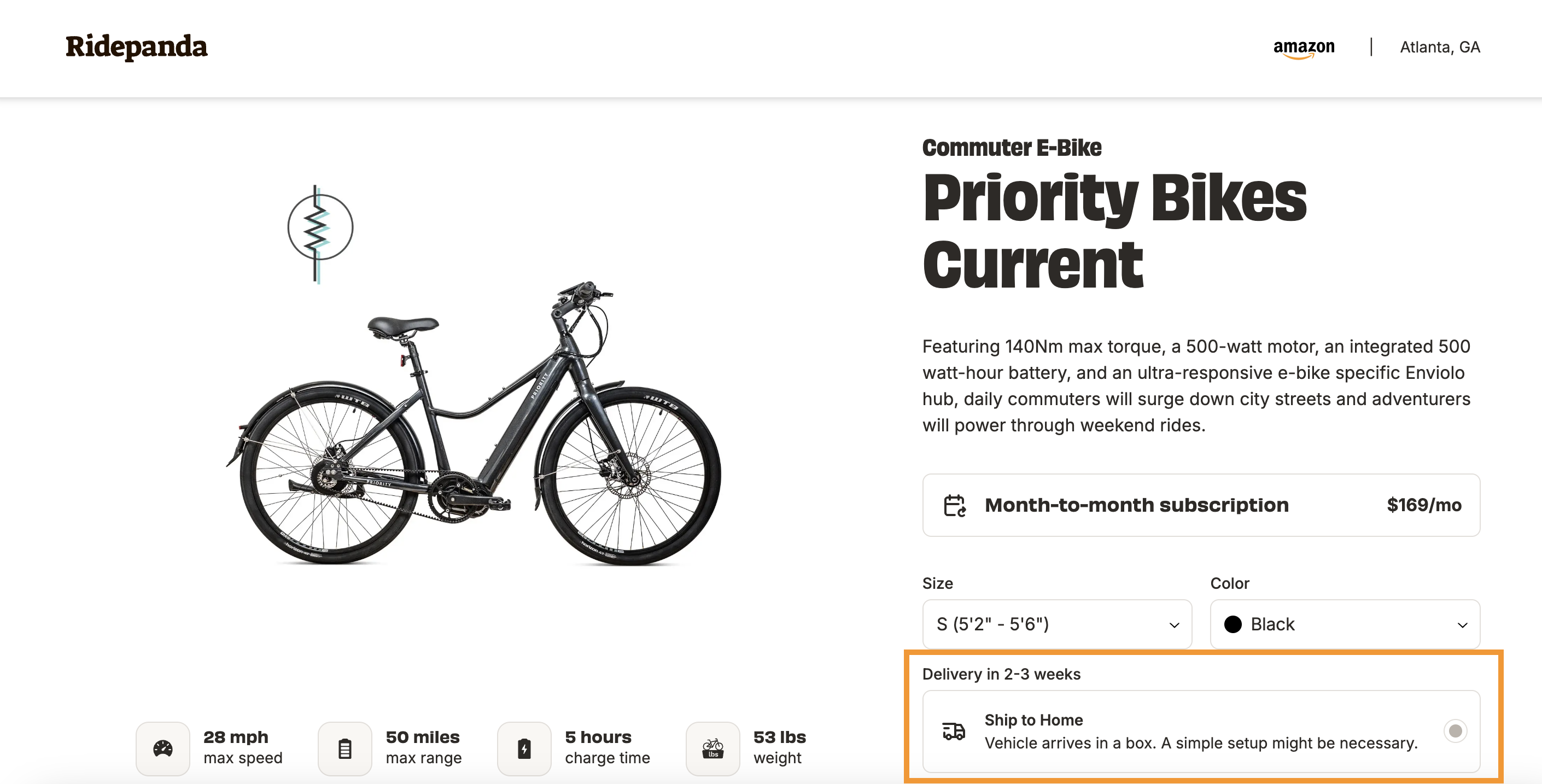
How long it takes to receive your swap depends on the model and inventory available. You can view the delivery timeline when you click on any vehicle and choose a size within our customer portal. You'll see the information displayed above the "Ship to Home" section.
Subscription Eligibility
This guide is for Direct Ship subscribers only.
Additional Resources
If you have questions or need assistance, please email us at support@ridepanda.com or call 1-650-523-9577.